How This Project Emerged From My Weekly Labs
Smart homes used to be science fiction. Now they're reality, and I got to build one—virtually, at least. When I first heard about IoT in my Industrial IoT course, I thought it was just about connecting things to the internet. Turns out, it's about making systems intelligent, responsive, and automated.
This project emerged from Experiment 3 of my IIoT coursework, where I learned that smart homes aren't just about convenience—they're about creating systems that respond to their environment, make decisions, and improve quality of life. Building this in Cisco Packet Tracer taught me that IoT is as much about network architecture as it is about sensors and actuators.
What the System Does
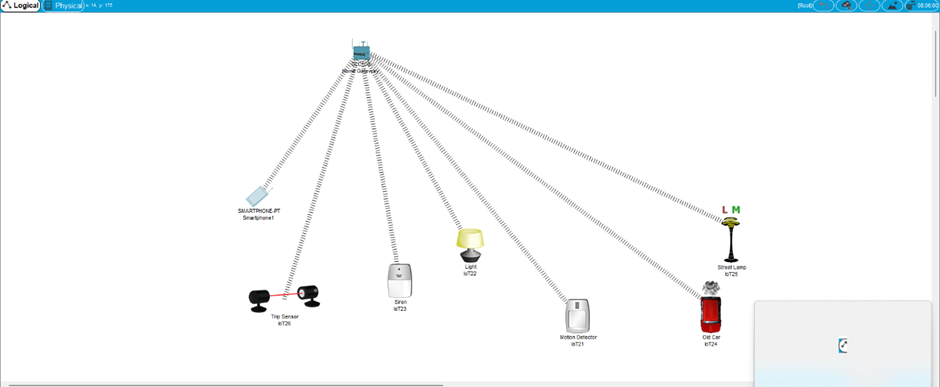
This project simulates a complete smart home environment with:
- Wireless Home Gateway: The central nervous system connecting all devices
- Smart Devices: Fans, lamps, and sensors that respond to environmental conditions
- Mobile Control: Smartphone interface for remote monitoring and control
- Automated Systems: Burglar alarms and building automation that respond to sensor inputs
- MQTT Protocol: Lightweight messaging protocol for efficient device communication
The system demonstrates how IoT devices communicate using MQTT, how automation logic works, and how a single gateway can coordinate an entire ecosystem of connected devices.
Architecture
Smart Home Ecosystem
                          Smartphone ──┐
             │
Motion Sensor ──┼── Wireless Home Gateway ── Fan
             │         (MQTT Broker)
Temperature Sensor ──┤
             │
Street Lamp ──┘
The wireless home gateway acts as the central hub and MQTT broker, receiving sensor data and controlling actuators. It's like having a smart brain that monitors your home and makes decisions based on what it sees.
System Components
Wireless Home Gateway The gateway is the heart of the smart home. It: - Connects to the network infrastructure - Acts as MQTT broker for device communication - Communicates with IoT devices using MQTT protocol - Processes sensor data - Controls actuators based on logic
Smart Devices - Fans: Respond to temperature conditions via MQTT messages - Lamps: Provide lighting control - Motion Sensors: Detect movement for security - Temperature Sensors: Monitor environmental conditions
Communication Protocols - MQTT: Primary protocol for device-to-gateway communication - I2C/SPI/UART: Used for sensor-to-microcontroller communication (Arduino, MSP) - HTTPS: Secure communication for mobile app control
Control Interface - Smartphone: Mobile app for remote monitoring and control
Implementation
Example 1: Basic Smart Home Setup
The foundation smart home includes: 1. Wireless Home Gateway: Central control unit and MQTT broker 2. Fan: Automated cooling system subscribing to temperature MQTT topics 3. Lamp: Smart lighting controlled via MQTT 4. Smartphone: Remote control interface using HTTPS
The gateway coordinates all devices through MQTT publish/subscribe messaging, allowing the smartphone to control the fan and lamp remotely. It's simple, but it demonstrates the core concept: centralized control of distributed devices through lightweight messaging.
Lab Exercise 1: Burglar Alarm System
This exercise taught me about sensor-driven automation:
System Requirements: - Motion detection triggers alarm - LED indicator shows alarm state - Street lamp activates when motion detected
Implementation Logic:
                          IF Motion Sensor Detects Movement:
    THEN:
        - Publish MQTT message to alarm topic
        - Turn ON LED (alarm indicator)
        - Turn ON Street Lamp (deterrent/visibility)
The beauty is in the simplicity. A single sensor input triggers multiple outputs through MQTT messaging, creating a coordinated response. It's like having a security guard that never sleeps.
Lab Exercise 2: Building Automation System
This is where it gets interesting—multi-condition logic:
System Requirements: - Temperature monitoring - Wind detection - Automated window control - AC system control
Implementation Logic:
                          IF Temperature == 20°C:
    THEN Publish MQTT command to open window

IF Temperature > 25°C AND High Winds:
    THEN:
        - Publish MQTT close window command
        - Publish MQTT AC activation command
This demonstrates conditional automation using MQTT messaging. The system doesn't just respond to one input—it considers multiple conditions and makes intelligent decisions through coordinated MQTT topics. It's like having a building manager that optimizes for comfort and energy efficiency.
Technical Deep Dive: MQTT Protocol
Why MQTT?
MQTT (Message Queuing Telemetry Transport) is perfect for IoT because it's: - Lightweight: Minimal overhead, ideal for constrained devices - Efficient: Low bandwidth usage, important for battery-powered sensors - Reliable: Quality of Service levels ensure message delivery - Scalable: Can handle thousands of devices
MQTT Architecture in This Project
The gateway acts as the MQTT broker, managing:
- Topics: Each device subscribes to relevant topics (e.g., /home/temperature, /home/motion)
- Publishers: Sensors publish data to topics
- Subscribers: Actuators subscribe to control topics
- QoS Levels: Different quality of service for different message types
Embedded Communication
For microcontroller-level communication (Arduino, MSP): - I2C: Used for connecting multiple sensors to a single microcontroller - SPI: High-speed communication for sensor data acquisition - UART: Serial communication between microcontrollers and gateway
These protocols handle the low-level sensor communication, while MQTT handles the network-level device coordination.
Challenges & Debugging
The Gateway Configuration Mystery
I spent way too long trying to figure out why my devices weren't communicating. The gateway was there, the devices were there, but nothing was talking.
Turns out, the gateway needs proper network configuration and MQTT broker setup. It's not enough to just place it in the workspace—you need to configure it like any other network device. IoT devices are still network devices, and they follow networking rules.
Lesson: IoT is built on networking fundamentals. If you don't understand networking and protocols like MQTT, you can't build IoT systems.
The MQTT Topic Design Challenge
Designing the MQTT topic structure was trickier than I expected. Should I use /home/temperature or /sensors/temp? How do I organize topics for scalability?
I learned that MQTT topic design is crucial. A well-designed topic structure makes the system maintainable and scalable. Poor topic design leads to confusion and maintenance nightmares.
Lesson: MQTT topic hierarchy matters. Design for clarity and scalability from the start.
The Sensor Logic Puzzle
Building the conditional automation system was tricky. When should the window open? When should it close? What if the temperature is exactly 25°C?
I learned that automation logic needs to be precise. Fuzzy conditions lead to unpredictable behavior. The system needs clear thresholds and well-defined states, communicated clearly through MQTT messages.
Lesson: Automation logic must be deterministic. Every condition must have a clear outcome, and MQTT messages must carry unambiguous commands.
The Multi-Device Coordination Challenge
Getting multiple devices to work together was harder than I expected. The fan, lamp, and sensors all needed to coordinate through the gateway using MQTT.
I learned that IoT systems are distributed systems. The gateway coordinates through MQTT, but each device operates independently. Understanding this distributed nature and MQTT's pub/sub model is crucial for building reliable IoT systems.
Lesson: IoT systems are distributed by nature. Design for coordination through MQTT, not centralization.
What I Learned
Technical Insights
IoT Philosophy
IoT taught me that connectivity is just the beginning. The real value is in the intelligence—the logic that processes sensor data and makes decisions. A connected device is just a device. A smart device is a system.
It also taught me about system thinking. Every device affects every other device. A temperature sensor doesn't just report temperature—it influences the fan, the AC, and the window through MQTT messaging. Understanding these relationships is crucial.
Future Improvements
This project covered smart home basics, but there's so much more to explore:
- Advanced Sensors: Light sensors, humidity sensors, air quality sensors
- Machine Learning: Predictive automation based on usage patterns
- Energy Management: Optimizing power consumption based on occupancy
- Security Systems: Multi-layer security with cameras, alarms, and access control
- Voice Control: Integration with voice assistants
- Cloud Integration: Remote monitoring and control from anywhere using MQTT over HTTPS
- Data Analytics: Learning from sensor data to optimize home operations
Each improvement builds on the fundamentals. Understanding basic automation, MQTT communication, and embedded protocols (I2C, SPI, UART) is the foundation for advanced smart home systems.
Conclusion
Building a smart home in Packet Tracer taught me that IoT isn't about the devices—it's about the system. A smart home is more than connected gadgets; it's an integrated ecosystem that responds, learns, and adapts through protocols like MQTT.
From simple device control to complex conditional automation, this project showed me how IoT systems work at a fundamental level. Whether it's a smart home, a smart factory, or a smart city, the principles are the same: sensors (communicating via I2C/SPI/UART), connectivity (through MQTT), intelligence (automation logic), and action (actuator control).
And remember: when your automation doesn't work, check the gateway configuration and MQTT topic structure. Trust me on this one.
---
"A smart home isn't about having connected devices—it's about having a system that thinks." – Every IoT engineer, eventually.