01 Project Overview
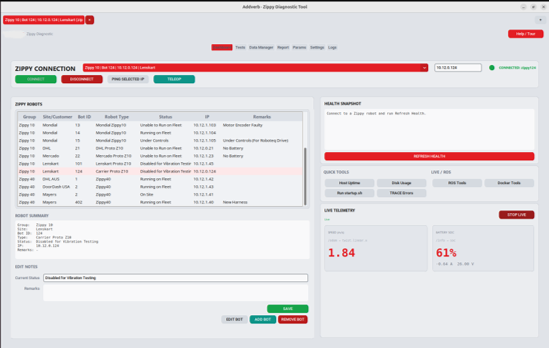
A GUI built to kill the manual SSH grind out of ROS-based fleet operations. Instead of hand-typing commands into a terminal for every robot, field engineers get one desktop console for connecting, running health checks, tracking errors, pulling bag data, editing configs, and pushing files across an entire AGV fleet — with fleet-wide reporting baked in. Packaged as a standalone binary so any teammate can run it with zero setup.
02 Key Features & Achievements
Single console for fleet-wide connect, health checks, and remote teleop
Full ROS bag lifecycle: record, browse, transfer, archive, reindex
Multi-bot push deploys files to many robots in parallel with error handling
Config-driven stack profiles support multiple robot architectures from one GUI
Excel fleet reporting and remote parameter editing with undo
03 Technical Stack
04 Challenges & Solutions
Challenge 1
Supporting multiple robot fleet architectures from one GUI without duplicating code
Solution
Built config-driven stack profiles that deep-merge per robot type, auto-selected by IP.
Challenge 2
A bot-side telemetry daemon silently died after robot reboots
Solution
Fixed a stale-PID check and moved autostart to a systemd timer instead of disabled cron.
05 Key Achievements
Replaced manual SSH scripts with one operator console used fleet-wide
Multi-bot push cut deployment from per-robot manual work to a few clicks
One codebase supports multiple robot architectures via config profiles
Shipped as a standalone binary — zero Python setup for new operators