How I Became Obsessed with Robot Navigation
There's something deeply satisfying about watching a robot navigate autonomously. Not the remote-controlled kind—I'm talking about a robot that knows where it is, understands where it wants to go, and figures out how to get there while avoiding obstacles. That's not just cool, that's actual autonomy.
This project started when I realized that navigation isn't just about having sensors or actuators. It's about integrating everything into a cohesive system that can simultaneously map an unknown environment, track its own position within that map, plan efficient paths, and execute those paths while avoiding obstacles. All in real-time. All reliably.
I wanted to build a complete navigation stack from scratch for a two-wheeled differential drive robot. Not just use someone else's package out of the box—understand it, modify it, make it work for my specific robot. The result? A custom ROS navigation stack that integrates SLAM (Simultaneous Localization and Mapping), AMCL (Adaptive Monte Carlo Localization), path planning, and control algorithms into one cohesive, working system.
What Makes a Two-Wheeled Robot Special?
Before diving into the navigation stack, I needed to understand what makes differential drive robots unique. These aren't just simpler versions of four-wheeled robots—they have their own quirks and advantages.
Zero-Radius Turning: The robot can turn in place, which is fantastic for confined spaces. But this capability also creates challenges in control and localization that four-wheeled systems don't face.
Kinematics Matter: A differential drive robot's motion depends on the speed difference between its two wheels. Understanding this relationship is fundamental to everything else—odometry calculation, motion prediction for SLAM, and control.
Dynamic Challenges: The robot can change direction instantly, which means localization algorithms need to track rapid orientation changes. Slip happens differently than in four-wheeled systems. The motion model has to account for this.
These characteristics meant I couldn't just copy-paste navigation parameters from a different robot. I had to tune everything specifically for this two-wheeled platform.
The Robot Platform — M2WR (Two-Wheeled Robot)
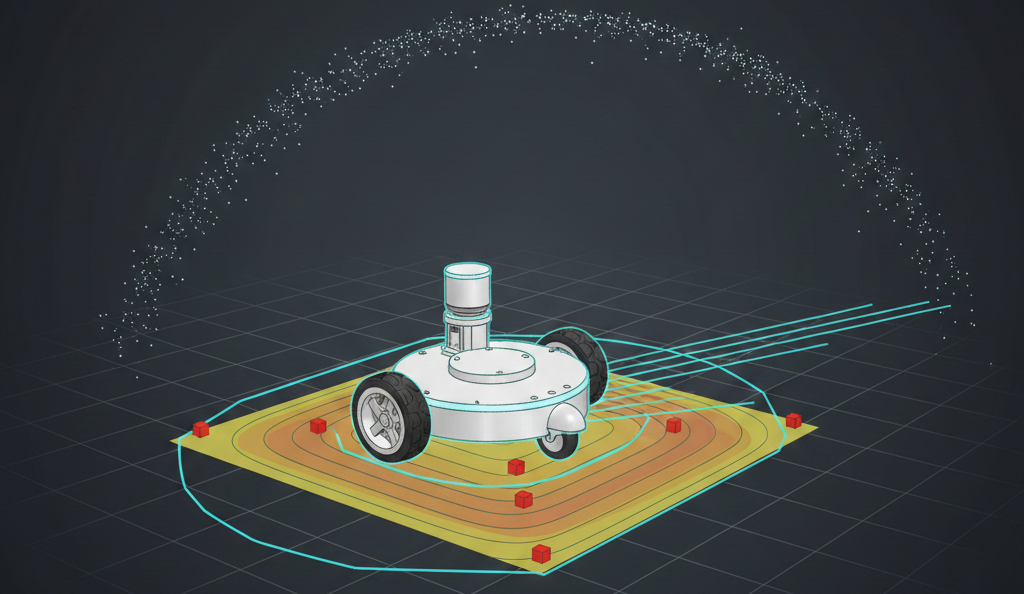
Every navigation stack needs a robot. My platform was the M2WR—a two-wheeled robot with differential drive kinematics. The physical structure includes a chassis (link_chassis) measuring 0.5m × 0.3m × 0.07m, two drive wheels connected via joints, a front caster wheel for stability, a LIDAR sensor (360-degree scanning), and an IMU for orientation and angular velocity sensing.
The sensor configuration uses a LIDAR scan topic /m2wr/laser/scan providing range measurements, IMU data for orientation tracking, and wheel encoders for odometry calculation. The URDF (Unified Robot Description Format) model defined all these components, their relationships, and their physical properties. This model became the foundation for everything—simulation, sensor frame transformations, and understanding how the robot moves through space.
SLAM — Teaching the Robot to Map While Moving
SLAM (Simultaneous Localization and Mapping) is like teaching a robot to create a map of its environment while simultaneously figuring out where it is on that map. It's a chicken-and-egg problem: you need a map to know where you are, but you need to know where you are to build the map.
Why Gmapping?
I chose Gmapping, a particle-filter-based SLAM algorithm. Gmapping maintains multiple hypotheses about both the map and the robot's pose using a probabilistic framework that handles uncertainty naturally—something every real-world robot needs. For indoor environments like the ones I was working with, Gmapping provides a good balance between map quality and computational requirements. It's not the newest algorithm, but it's proven and reliable. Gmapping has excellent ROS support, which meant I could focus on tuning and integration rather than implementing SLAM from scratch.
Tuning for Two-Wheeled Robots
The motion model parameters became critical. These define how much uncertainty accumulates as the robot moves. The key parameters include rotation noise affecting rotation (srr: 0.01), translation noise affecting rotation (srt: 0.02), rotation noise affecting translation (str: 0.01), and translation noise affecting translation (stt: 0.02).
For a differential drive robot, these parameters needed to account for wheel slip during turns, uneven weight distribution, surface friction variations, and rapid orientation changes. I tuned these through iterative testing—make a change, drive the robot, see how the map quality improved or degraded. It was methodical, sometimes tedious, but absolutely necessary.
Sensor Model Calibration
The LIDAR sensor model defines how laser measurements relate to obstacles. The key parameters include maximum range (10.0 meters), maximum beams (180), hit probability (1.0), hit standard deviation (0.2), and model type (likelihood_field). The likelihood_field model works well for indoor environments with regular geometries. The parameters control how confident the algorithm is in different types of measurements—direct hits, short readings (likely obstacles), max-range readings (nothing detected), and random noise.
Getting the particle count right was a balancing act. Too few particles and map quality suffers, localization becomes unreliable. Too many particles and computational overload occurs with slow updates. I settled on 80 particles for mapping, which provided good quality while maintaining real-time performance.
Map Updates and Real-Time Performance
The update parameters control when Gmapping recalculates the map. The linear update threshold is 0.5 meters, meaning the map updates every 0.5 meters of linear movement. The angular update threshold is 0.436 radians (25 degrees), meaning the map updates every 25 degrees of rotation. These thresholds prevent the algorithm from recomputing on every tiny movement while ensuring the map stays current. Finding the right balance was crucial—too frequent and computation becomes overwhelming; too infrequent and the map becomes stale.
Localization — AMCL and the Particle Filter Approach
Once you have a map (or even during mapping), the robot needs to know where it is. That's where AMCL (Adaptive Monte Carlo Localization) comes in.
How AMCL Works
AMCL maintains a probability distribution over possible robot poses using a particle filter. Think of it like this: instead of being certain "I'm at position (5, 3) facing north," AMCL says "I'm probably near (5, 3), but I might be at (5.1, 2.9) or (4.9, 3.1), and here's how confident I am about each possibility."
Each particle represents a hypothesis about the robot's pose (x, y, theta). The algorithm maintains hundreds or thousands of these particles. As the robot moves, particles spread out based on the motion model, representing growing uncertainty. When new sensor data arrives, particles get weighted based on how well they explain the observations. Good hypotheses get reinforced; bad ones get diminished. Periodically, the algorithm resamples—keeping likely particles and replacing unlikely ones. This focuses computational effort on promising regions.
Adaptive Behavior
The "Adaptive" in AMCL means the algorithm adjusts the number of particles based on uncertainty. When uncertainty is high (e.g., after getting lost), more particles explore possibilities. When uncertainty is low (tracking well), fewer particles are used for efficiency. My configuration used minimum particles of 500, maximum particles of 5000, and an adaptive threshold (kld_err) of 0.05. This adaptive behavior is crucial for real-world operation—the robot needs more computational resources when lost, but can be efficient when tracking well.
Tuning for Differential Drive
The odometry model parameters had to account for differential drive kinematics. The configuration uses a diff-corrected odometry model type with rotation error affecting rotation (odom_alpha1: 0.02), translation error affecting rotation (odom_alpha2: 0.01), rotation error affecting translation (odom_alpha3: 0.01), and translation error affecting translation (odom_alpha4: 0.01). These alpha parameters define noise covariance in the motion model. For differential drive robots, rotation errors can significantly affect translation (and vice versa), so these correlations matter.
Recovery from Localization Failure
One of AMCL's strengths is recovery from localization failures. If the robot gets "kidnapped" (moved while sensors are off) or loses track, the algorithm can recover. The recovery parameters include slow recovery rate (recovery_alpha_slow: 0.00) and fast recovery rate (recovery_alpha_fast: 0.00). These parameters control how quickly the particle filter expands its search when localization confidence drops. Properly tuned, AMCL can recover from significant pose uncertainty.
Path Planning — Getting from Here to There (Efficiently)
Having a map and knowing where you are is only half the battle. The robot also needs to figure out how to get where it's going.
The move_base Architecture
ROS's move_base package provides a flexible framework for path planning. It combines a global planner that computes a path from current position to goal considering the entire map, a local planner that adjusts the path in real-time to avoid obstacles and handle dynamic changes, and costmaps that represent the environment as grids with cost values—high cost for obstacles, low cost for free space.
Global Planning
The global planner (typically A* or Dijkstra's algorithm) finds a path through the known map. It works with the global costmap, which represents all known obstacles. Key considerations include resolution (higher resolution means more precise paths but more computation), inflation (obstacles are "inflated" to account for robot size—the robot shouldn't try to squeeze through tight spaces), and the distinction between lethal cells (completely blocked) and inflated cells (just expensive to traverse).
Local Planning with DWA Planner
The DWA Planner handles local obstacle avoidance and path following. Instead of planning a detailed path, DWA Planner considers possible velocity commands and evaluates them based on achievability (can the robot execute this command given its dynamics?), goal progress (does this move toward the goal?), and safety (does this avoid obstacles?).
DWA Planner samples velocity space within a "dynamic window"—velocities reachable in the next few timesteps. For each sample, it simulates the resulting trajectory and scores it. For a two-wheeled robot, the velocity space is (linear_velocity, angular_velocity), and DWA Planner needs to understand the robot's acceleration limits to define the dynamic window correctly.
Costmap Configuration
Both global and local planners use costmaps. The global costmap uses the map frame and represents the entire environment with update frequency of 1.0 Hz and publish frequency of 2.0 Hz. It uses a static map with no rolling window. The local costmap uses the odom frame (which drifts but is locally accurate) and represents just the immediate surroundings with update frequency of 5.0 Hz and publish frequency of 2.0 Hz. It uses a rolling window with width and height of 6.0 meters, updating as the robot moves.
Recovery Behaviors
Sometimes the robot gets stuck. Recovery behaviors help by rotating in place to get a better view or clearing the costmap. If the planner can't find a path, the robot might rotate in place to get a better view or try clearing the costmap. These behaviors are safety nets for edge cases.
Control — Making It Actually Move
Path planning gives you a desired trajectory. Control makes the robot follow it.
PID Controller for Wall Centering
I implemented a PID controller for a specific behavior: centering the robot between two walls. This might seem like a simple application, but it demonstrates important control principles.
The controller uses LIDAR data to measure distances to left and right walls. The LIDAR data is segmented into regions: right (ranges 0-143), front-right (ranges 144-287), front (ranges 288-431), front-left (ranges 432-575), and left (ranges 576-713).
The PID controller adjusts angular velocity to minimize the error between left and right distances. The controller uses proportional gain (Kp=0.5), integral gain (Ki=0.005), and derivative gain (Kd=0.2). The proportional term responds to current error, the integral term eliminates steady-state error, and the derivative term dampens oscillations. Tuning these gains was iterative—too aggressive and the robot oscillates; too conservative and it responds slowly.
Velocity Commands
The controller publishes velocity commands to /cmd_vel. For differential drive, these commands translate directly to wheel speeds through the kinematic model. The linear velocity and angular velocity commands are computed based on the PID controller output.
Odometry Integration
I also implemented an IMU-to-odometry converter. This takes IMU orientation data and publishes it as odometry messages, which can be fused with wheel odometry for better pose estimation. The converter performs quaternion to Euler angle conversion, integrates orientation and angular velocity, generates odometry messages, and handles frame transformations. This demonstrates the kind of sensor fusion that makes navigation robust—combining multiple sensor sources to get better estimates than any single source provides alone.
Integration — Making It All Work Together
Building individual components is one thing. Making them work together seamlessly is another.
Launch File Architecture
ROS launch files orchestrate the entire system. The navigation launch file includes a map server node that loads the map from the motion_plan package, an AMCL localization node included from the nav_bot_stack package, a path planning node included from the nav_bot_stack package, and a visualization node (RViz) for debugging. These launch files handle starting all necessary nodes, setting parameters, establishing topic remappings, and coordinating startup sequences.
Frame Transformations
Getting coordinate frames right is critical. The robot has multiple frames: map (global, fixed frame for the SLAM map), odom (drifting but locally accurate frame from wheel odometry), base_link (robot's base frame), laser (LIDAR sensor frame), and imu_link (IMU sensor frame). The TF (transform) system maintains the relationships between these frames. If any transformation is wrong, everything breaks—the robot thinks obstacles are in the wrong places, plans paths incorrectly, and generally behaves like it's lost (which it is).
Topic Architecture
The system communicates through ROS topics. The LIDAR scan topic /m2wr/laser/scan feeds into Gmapping which publishes the map, and also feeds into AMCL for localization updates. The velocity command topic /cmd_vel goes to the robot driver for wheel control. The odometry topic /odom provides pose information to both AMCL and move_base. The goal topic /goal sends navigation goals to move_base. Understanding this message flow is essential for debugging. When something doesn't work, you trace the data: Is the LIDAR publishing? Is SLAM receiving it? Is the map updating? Is AMCL using the map? And so on.
Testing and Tuning — The Iterative Reality
Navigation stacks don't work perfectly on the first try. They require extensive testing and parameter tuning.
Simulation First
Before testing on hardware, I validated everything in Gazebo simulation. The robot model matches URDF, sensors behave realistically, algorithms work with simulated noise, and performance is acceptable. Simulation lets you test edge cases safely: What if the robot gets kidnapped? What if sensors fail? What if the map is wrong?
Real-World Testing
Real hardware introduces complications simulation doesn't capture. Real LIDAR has noise patterns that don't match ideal models. Wheel encoders accumulate error, especially during turns. Real processors can't always keep up with ideal update rates. Mechanical issues include wheel slip, motors that don't respond instantly, and surfaces that aren't perfectly flat.
I tuned parameters through iterative testing: make a change to a parameter, test in a known environment, evaluate performance (localization accuracy, path quality, etc.), adjust based on results, and repeat.
Performance Metrics
Success wasn't binary. I tracked multiple metrics. Localization accuracy measures how well AMCL tracks the true pose, measured by comparing estimated pose to ground truth. Map quality evaluates whether the SLAM map accurately represents the environment, evaluated by visual inspection and comparison to known layouts. Path planning efficiency assesses whether planned paths make sense, are efficient, and avoid obstacles. Real-time performance determines whether the system can keep up and if updates are happening fast enough.
The ITR report mentioned achieving 95% localization accuracy, which validated that the approach was effective. This wasn't just "it works"—it was "it works well."
Challenges and Solutions
Not everything went smoothly. Here are the highlights:
Coordinate Frame Confusion
Early on, the robot thought it was in completely wrong places. Turns out I had coordinate frame transformations wrong. The LIDAR frame wasn't properly linked to the base frame, so obstacle positions were offset. The solution was to carefully verify every TF relationship and use RViz to visualize frames and ensure they make sense.
Parameter Tuning Hell
There are so many parameters to tune. Motion model parameters, sensor model parameters, planner parameters, costmap parameters... It's easy to get lost. The solution was to change one thing at a time, keep a log of what you changed and what the effect was, and focus on the high-impact parameters first.
Computational Bottlenecks
Running SLAM, AMCL, path planning, and control simultaneously can be computationally expensive. On limited hardware, the system might not keep up. The solution was to optimize update frequencies. Global planning doesn't need to run as often as local planning. Some parameters (like particle counts) can be reduced if necessary, trading off quality for performance.
Dynamic Obstacles
The initial system handled static maps well, but what about moving obstacles? A person walking in front of the robot needs to be handled differently than a static wall. The solution is that the local costmap updates frequently and includes sensor data, so it naturally handles dynamic obstacles. The local planner adjusts paths in real-time.
Localization Failure Recovery
Sometimes the robot loses track. Maybe sensors failed temporarily, or it got moved unexpectedly. Recovery is crucial. AMCL's adaptive particle filter helps, but sometimes manual intervention is needed. The recovery behaviors provide fallbacks, and sometimes you just need to give the robot a better initial pose estimate.
What I Learned About Navigation
This project taught me that navigation isn't a single algorithm—it's a system of algorithms working together. Each component (SLAM, localization, planning, control) has its own challenges, but the real complexity comes from their interactions.
Systems Thinking
Every parameter change affects multiple components. Tune the motion model for SLAM, and it affects AMCL. Change the costmap inflation, and path planning behaves differently. Understanding these interactions is essential.
The Importance of Tuning
You can't just use default parameters. Every robot is different. Every environment is different. Tuning is where the science becomes engineering—applying general principles to specific situations.
Simulation vs. Reality
Simulation is invaluable for development and testing, but reality always has surprises. The gap between simulated and real performance highlights what you don't yet understand about your system.
Documentation Matters
With so many parameters and configurations, documentation is crucial. I kept notes on what each parameter does, what values I tried, and what worked. Without this, you're just randomly tweaking numbers.
Modularity and Reusability
Building the navigation stack modularly meant I could reuse components. The same AMCL configuration could work with different maps. The same planning stack could work with different robots (after tuning, of course).
Future Improvements
Every project teaches you what you'd do differently:
Advanced SLAM Algorithms
Gmapping works well, but newer algorithms like Cartographer or RTAB-Map offer better loop closure and more efficient map representations. Exploring these would be valuable.
Multi-Sensor Fusion
Currently, the system primarily uses LIDAR. Adding cameras, depth sensors, or other modalities could improve robustness and enable semantic understanding of the environment.
Machine Learning Integration
Machine learning could help with learning better motion models from data, improving path planning with learned heuristics, and enabling semantic mapping that understands what objects are, not just where they are.
Robustness Improvements
Future work could focus on better handling of dynamic environments, more sophisticated recovery behaviors, and online parameter adaptation based on performance metrics.
Performance Optimization
Performance improvements could include more efficient algorithms for resource-constrained platforms, better use of parallel processing, and optimized data structures and message passing.
Conclusion
Building a custom navigation stack from scratch was challenging, sometimes frustrating, but incredibly educational. It's one thing to understand SLAM, localization, and path planning as separate concepts. It's another to integrate them into a working system, tune the countless parameters, debug the inevitable issues, and finally watch a robot navigate autonomously.
The system achieved 95% localization accuracy and demonstrated reliable navigation in indoor environments. But more importantly, it gave me deep understanding of how autonomous navigation actually works—not from textbooks or papers, but from building it, breaking it, fixing it, and making it work.
That understanding is worth more than any working system. Because once you understand the pieces and how they fit together, you can adapt, improve, and extend the system for new applications. And that's what engineering is really about—not just building something that works, but understanding it deeply enough to make it work better.
The robot can navigate. More importantly, I understand how it does it. And that's the foundation for building even more capable systems in the future.