How This Industrial Robotics Adventure Started
I entered this project thinking industrial robots were just bigger versions of hobby servos. I was wrong. They're precision machines that can weld, paint, assemble, and move with sub-millimeter accuracy. And programming them requires understanding kinematics, trajectory planning, and safety systems.
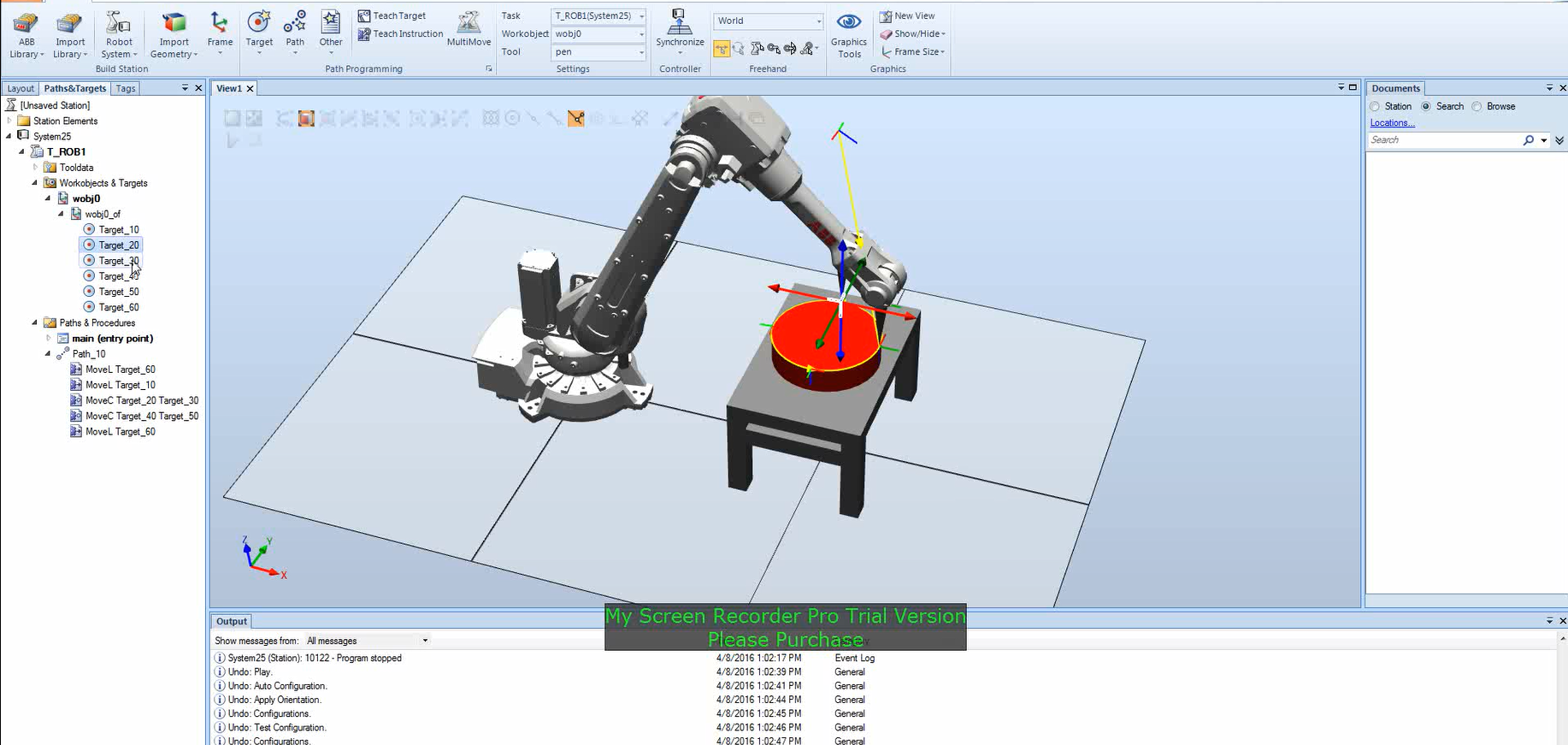
RobotStudio is basically digital Lego, except you can crash million-dollar robots safely. It's a simulation environment where you can program ABB industrial robots, test trajectories, and verify operations before deploying to real hardware. And trust me, you want to test in simulation first.
This project wasn't just about moving a robot arm. It was about understanding industrial automation, trajectory planning, workcell design, and the RAPID programming language that controls ABB robots. I built two major projects: a custom end-effector trajectory planning system and a complete welding workcell with programmed weld paths.
The First Reality Check: This Isn't Python
My first mistake was assuming RAPID would be like Python or C++. Nope. RAPID is ABB's domain-specific language built specifically for robotics. It's all about targets, motion commands, and tool management. Think of it as the robot's native tongue—you can't just translate your Python code and expect it to work.
Here's what a simple RAPID program looks like:
MODULE MainModule
    VAR robtarget Target_10 := [[100, 200, 300], [1, 0, 0, 0], [0, 0, 0, 0], [9E9, 9E9, 9E9, 9E9, 9E9, 9E9]];
    VAR robtarget Target_20 := [[200, 200, 300], [1, 0, 0, 0], [0, 0, 0, 0], [9E9, 9E9, 9E9, 9E9, 9E9, 9E9]];

    PROC main()
        MoveL Target_10, v100, fine, tool0;
        MoveL Target_20, v100, fine, tool0;
    ENDPROC
ENDMODULE
That's a robot moving in a straight line from point A to point B. Simple, right? But wait until you're trying to plan a complex welding path with multiple waypoints, circular arcs, and zone-based motion. Suddenly, every parameter matters.
Building My First Workcell
For my custom end-effector project, I had to design a complete workcell. This meant choosing the right robot (ABB IRB series), defining my custom tool with its center point (TCP), setting up work coordinate systems, and teaching the robot all its waypoints. It's like choreographing a dance, except the dancer is a six-axis industrial robot and one wrong move could cost thousands.
The trajectory planning was where things got interesting. I learned that robots don't just move from point A to point B—they follow specific motion types. MoveL for linear (straight-line) paths, MoveC for circular arcs, and MoveJ for joint motion (the fastest path, but not always straight). Each has its purpose, and choosing the wrong one can mean the difference between a smooth operation and a collision.
I spent hours tweaking speed settings (v50, v100, v500), precision zones (fine, z5, z10, z20), and path sequences. The "fine" precision means the robot stops exactly at the target—great for positioning, terrible for continuous operations like welding. Zone-based motion creates smooth, flowing paths that keep production moving.
The Welding Project: Where Things Got Real
My second project was a complete welding workcell. This is where I learned that industrial robotics isn't just about moving robots—it's about understanding manufacturing processes. I had to configure a weld gun, position workpieces with fixtures, and program a complete welding sequence.
The welding path had to be perfect. Too fast, and the weld quality suffers. Too slow, and you're wasting production time. The path had to be continuous—no stops, no jerky motions. I learned to use ArcL commands for the actual welding, with zone-based motion to keep things smooth around corners.
Here's what a welding sequence looks like in RAPID:
MoveJ Home, v500, fine, tool0;
MoveL Target_10, v100, fine, tool0;
ArcLStart Target_10, v50, seam1, weld1, fine, tool0;
ArcL Target_20, v50, seam1, weld1, z5, tool0;
ArcL Target_30, v50, seam1, weld1, z5, tool0;
ArcLEnd Target_40, v50, seam1, weld1, fine, tool0;
MoveL Home, v500, fine, tool0;
That's a complete welding cycle: move to start, begin arc, weld along path, end arc, return home. Every command matters, every parameter affects quality.
The Debugging Stories That Taught Me Everything
You don't really learn industrial robotics until things go wrong. Here are the moments that shaped my understanding:
The Target That Wasn't Reachable
I spent an entire afternoon trying to get my robot to reach Target_20. The coordinates looked fine, the robot was in the right configuration, but RobotStudio kept saying "Target not reachable." Turns out, industrial robots have multiple solutions for the same position—different joint configurations that achieve the same end-effector pose. The default configuration violated joint limits, but manually changing the configuration solved it. Lesson learned: always check robot configurations, not just coordinates.
The Collision That Almost Happened
I programmed what I thought was a perfect path: MoveL from Target_10 to Target_20. The endpoints were clear, so I assumed the path would be too. Wrong. Linear moves create straight-line paths, and my straight line passed right through the workpiece. The robot didn't automatically avoid obstacles—I had to add intermediate waypoints or switch to joint motion for non-critical segments. Simulation saved me from a very expensive mistake.
The Weld That Wasn't Smooth
My first welding program had the robot stopping at every waypoint. The weld quality was terrible—jerky motion, inconsistent bead. I was using "fine" precision everywhere, which meant the robot stopped completely at each point. Welding needs continuous motion, so I switched to zone-based motion (z5, z10) for the welding segments. The difference was night and day. Smooth, continuous welds that actually looked professional.
The Tool That Wasn't Calibrated
Nothing is more frustrating than programming perfect paths and watching the robot miss every target. My tool center point (TCP) was off by just a few millimeters, but that meant every movement was offset. I had to recalibrate using the 4-point method, updating the tool definition, and verifying with test movements. Tool calibration isn't optional—it's critical. One wrong TCP value, and your entire program is useless.
What I Actually Learned
Beyond the technical details, this project taught me that industrial robotics is fundamentally different from hobby robotics. These aren't toys—they're precision manufacturing tools that run 24/7, handle heavy payloads, and require sub-millimeter accuracy. Every decision matters: path planning affects cycle time, tool calibration affects quality, and workcell design affects safety.
Simulation isn't optional—it's essential. RobotStudio lets you crash robots safely, test paths, verify collisions, and optimize cycles before touching real hardware. That's not just convenient; it's the difference between a successful deployment and a very expensive mistake.
RAPID isn't a general-purpose language, and that's its strength. It's built for robotics, with motion commands, target definitions, and tool management baked in. Learning it felt like learning a new way of thinking about robot control—not just "move here," but "move here, this way, at this speed, with this precision, using this tool."
Zone-based motion changed how I think about robot paths. "Fine" precision is for positioning, but continuous operations need smooth, flowing motion. Understanding when to use each approach is the difference between a functional program and an optimized one.
The Bottom Line
RobotStudio is where industrial robotics begins. It's a simulation environment that lets you program, test, and verify robot operations before deploying to million-dollar hardware. This project taught me that industrial automation isn't just about moving robots—it's about understanding kinematics, planning efficient paths, designing workcells, and programming in domain-specific languages.
Every trajectory planned, every target defined, every path programmed is a step toward industrial automation. And that's the future of manufacturing. RobotStudio lets you crash robots safely, and that's exactly why you use it. Test everything, verify paths, check collisions, optimize cycles—all before touching real hardware.
If you're getting into industrial robotics, start with simulation. Learn RAPID, understand motion types, master tool calibration, and always verify in RobotStudio first. Because when you're working with million-dollar robots, you want to make your mistakes in software, not hardware.
Tech Stack: ABB RobotStudio, RAPID Programming Language, Industrial Robotics
Concepts: Robot Kinematics, Trajectory Planning, Workcell Design, RAPID Programming, Industrial Automation
Year: 2024
Module: Robotics Lab – Industrial Robotics